Weather Forecast
- 4.6
- Rating
- 5.00M
- Installs
- Free
- Price
 Analysis by App-foxy
I usually want a weather app to answer one question quickly: should I leave now, wait, or take another layer? Weather Forecast by Coolexp is built around that simple need, while still offering a more detailed view through weather radar. After using it as a daily forecast tool, I found it most useful when I treated it as a quick planning aid rather than a complete replacement for every specialized weather service.
The app is free to download and suitable for everyone, which makes it easy to try without committing to a subscription. It supports Android devices running version 6.0 or later, and the current release is version 2.4. Coolexp has clearly aimed for a balance between a straightforward interface and more professional-looking weather information, but that balance also means the experience depends on how patiently you set it up and interpret what it shows.
Where the experience can become confusing
The first point where I would expect some users to hesitate is location setup. A weather app needs a useful place before its forecast can mean anything, and the result can feel unhelpful if the selected location is wrong, too broad, or not the place you actually care about. I recommend checking the displayed location before judging the forecast itself. A forecast for a nearby town may not match your street, especially when rain is moving across a small area.
You May Also Like

 Blood Strike: 2.5 Anniversary
Blood Strike’s Loadouts Turn Every Drop Into a Tactical Gamble
A close look at Blood Strike’s custom loadouts: how fast access to signature weapons reshapes its battle royale rhythm, rewards preparation, and narrows the gap between fights.

 Pandora - Music & Podcasts
Pandora’s Music Is Easy to Start, but Harder to Recover
Pandora’s strength is its low-effort path from a seed to a station. Its weak spot is how much confidence it asks you to place in connection, setup, and quiet recovery.

 8 Ball Pool
 Is Built on Rivalries, Rematches, and Routine
A close look at the rivalries, rematches, shared routines, and unanswered safety questions that turn a quick pool match into a persistent mobile community.

 Samsung Music
’s Quiet Strength Is Playing What You Already Own
Its reach comes less from spectacle than from dependable access to a personal library. That simplicity is both the app’s strongest retention engine and its ceiling.

 AccuWeather: Weather Radar
AccuWeather Review: A Quick, Clear Forecast for Everyday Decisions
For everyday plans, the best forecast is the one you can understand quickly. AccuWeather makes rain timing, radar, and local conditions easy to act on, with a few trade-offs.

 Hill Climb Racing
Why Hill Climb Racing Still Turns Crashes Into One More Run
A tiny car, a bumpy hill and one more upgrade: Hill Climb Racing keeps resurfacing because its simple chaos makes every near-miss feel personal.
More From Our News Desk



This is particularly important with the radar view. Radar is valuable because it helps me see whether a rain band is approaching, passing nearby, or moving away, but it is not the same thing as a precise promise about conditions at my exact door. If the map looks different from what I see outside, I first check the location and the time context rather than assuming the app is broken.
Another possible sticking point is the difference between a forecast and a live observation. A forecast describes expected conditions, while radar shows the movement or presence of precipitation information in a visual way. Those two views can disagree briefly because weather changes faster than a forecast summary. I find the best results come from using the forecast for planning and the radar for a short-term reality check.
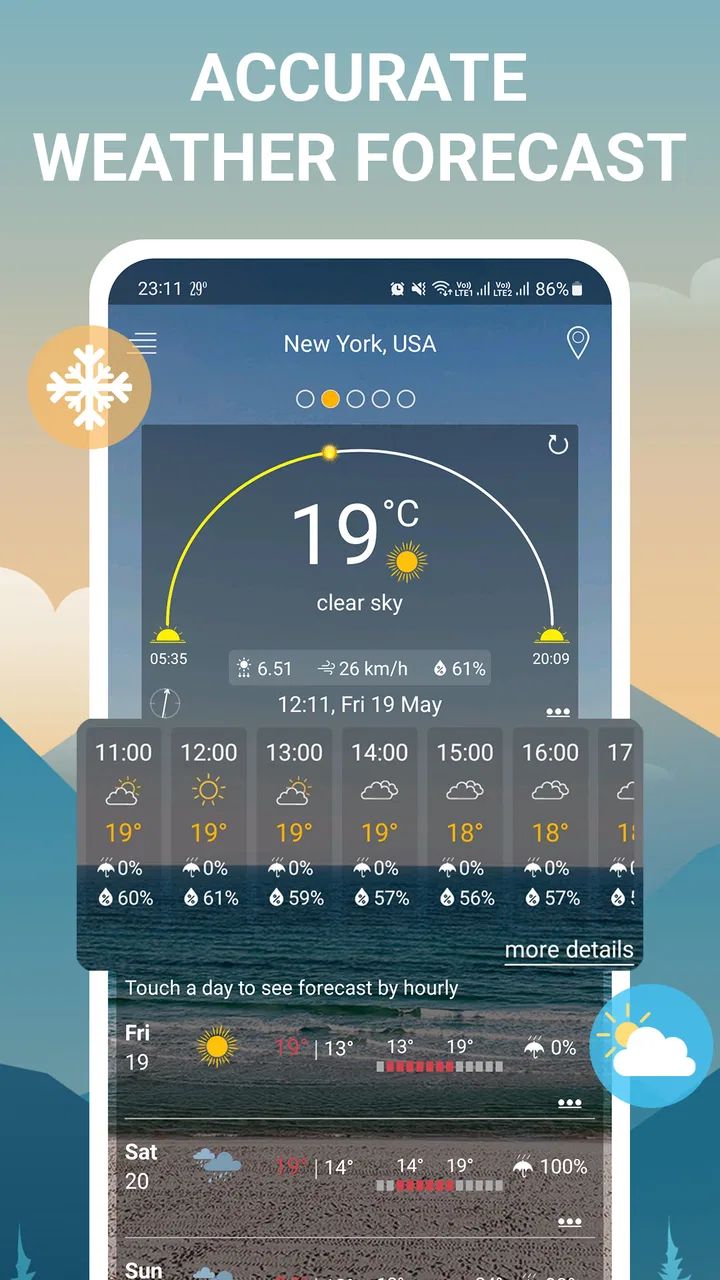
The app’s short description is simply “Weather Forecast,” but its broader purpose is more interesting than that label suggests. It combines an easy daily view with radar access, so I can use one screen for routine decisions and another when timing matters. That makes it more practical than a basic temperature widget, although it may feel less specialized than an app designed only for storm tracking.
What I check before blaming the forecast
When the information seems stale or unexpected, I use a simple sequence. I start by confirming that I am looking at the intended location. Then I leave the current screen and return to it, giving the app a chance to refresh its presentation. If the issue appears only in the radar view, I compare it with the ordinary forecast instead of treating both displays as identical sources.
I also avoid making a decision from one glance when the weather is changing quickly. For example, a dry-looking forecast does not necessarily mean a short shower will not cross my route. In that situation, the radar is the more useful part of Weather Forecast, while the general forecast gives me the wider expectation for the day.
The most useful habit is to separate “what is expected today” from “what is moving toward me now.” That small distinction prevents a lot of frustration and is more helpful than repeatedly refreshing the same screen.
Setup checks that make everyday use smoother
My first setup check is the location itself. I would not begin by exploring every screen. I would first make sure the app is centered on the place where I spend time: home, work, school, or a regular travel destination. If I am planning a trip, I would switch deliberately to the destination rather than assuming the home forecast is close enough.
That workflow matters because weather can vary within a short distance. A forecast that is perfectly reasonable for one side of a city may be less useful for an outdoor event several kilometers away. Weather Forecast becomes more dependable as a planning tool when the chosen location matches the decision I am making.
Next, I check whether the forecast is being read for the right time period. A daily summary is useful for deciding what to wear or whether to carry an umbrella, but it should not be treated as a minute-by-minute guarantee. When I need to leave soon, I look at the radar and use it alongside the forecast, not instead of it.
The app is free, but it includes in-app purchases priced at $2.99 per item. That is worth remembering before exploring optional extras. I would begin with the free experience and decide whether the additional purchase is genuinely useful for my routine. Someone who only checks the weather once in the morning may get everything needed without spending anything, while a frequent weather watcher may value extra options if they improve the particular workflow they use.
Weather Forecast has an average rating of 4.6 from around 50K ratings, and it has passed 5M installs. Those figures suggest that the app has reached a substantial audience, but they should not replace a personal test on your device. Weather apps are especially sensitive to local expectations, screen size, connection conditions, and how much detail a person wants.
A practical setup for commuting and errands
For a normal workday, I would set the app to the location where I will spend most of the day, check the main forecast before leaving, and open radar only if rain timing affects the journey. This avoids wasting time studying a map when a quick answer is enough. If I have a long walk, I give the radar more attention because a short shower can matter more than the overall daily outlook.
For errands, I use a different rule: check once before leaving and again only when the weather is visibly changing. Constantly reopening a weather app can create the illusion that the forecast is becoming more accurate, when in reality conditions may simply be shifting. The app is most useful when it supports a decision rather than becoming the decision itself.
For outdoor plans, I would check the forecast earlier in the day and then use radar closer to the start time. This two-stage approach is one of the better ways to use the app. The forecast helps decide whether the plan is sensible; radar helps decide whether the next part of the journey needs a jacket, cover, or a short delay.
Recovering when the normal workflow breaks
If the app appears to show the wrong place, I would correct the location before trying anything more complicated. If the forecast looks old, I would revisit the screen and allow a moment for the information to update. If only one view behaves strangely, I would continue using the other view temporarily rather than assuming the entire app is unusable.
This is a useful recovery mindset because weather information is not one single display. The ordinary forecast and radar serve different jobs. If radar is not helping with a simple clothing decision, I can still use the main forecast. If the main summary feels too general for a rain decision, radar may provide the more practical context.
I would also avoid treating a brief mismatch as proof that the app has failed. A rain shower can develop or move between forecast updates, and radar imagery can be difficult to interpret at the edge of a weather system. The right response is to compare the app’s information with the sky, the timing, and the location rather than following a single screen blindly.
When I am planning something important, I use Weather Forecast as one input and keep a backup habit: look outside, allow extra time, and prepare for a reasonable change in conditions. That is not a criticism unique to this app. It is simply the reality of weather prediction, especially when a decision depends on a narrow window.
How to read the radar without overestimating it
The radar is the feature that most clearly separates this app from a very basic forecast tool, but it also demands the most judgment. I look for the direction and apparent movement of precipitation rather than focusing only on the strongest color or most dramatic patch. A large area on the map does not automatically mean my exact location will receive heavy rain.
I also consider travel direction. A shower approaching from the west may matter greatly for a westbound walk but less for a short trip in another direction. This is a small, practical use of the map that a generic weather summary cannot provide. It turns the radar from a decorative screen into a planning aid.
For cycling, walking, or waiting for a bus, I use radar to decide whether leaving a few minutes earlier is sensible. For a full-day event, I do not rely on it alone because a radar snapshot is better for near-term timing than for the entire day. That distinction helps prevent both false confidence and unnecessary alarm.
When the app is not the cause of the problem
Sometimes the difficulty is not the application at all. Local weather can change quickly, and conditions may differ between a forecast location and the place where I am standing. A phone can also present information that feels delayed when the environment itself is changing rapidly. Before concluding that Weather Forecast is inaccurate, I compare the selected location, the forecast period, and the actual timing of the event.
There is also a human factor. I may remember that the app showed “rain” and overlook the time window or the fact that the prediction described a possibility rather than continuous rain. Reading the forecast carefully is more important than simply checking whether a rain symbol appeared somewhere on the screen.
For severe or safety-critical situations, I would not make this app my only source. A general weather app is convenient for daily choices, but urgent travel, outdoor work, or dangerous conditions deserve attention from official local alerts and other authoritative sources. Weather Forecast can help me understand the immediate picture, yet convenience should not be confused with emergency guidance.
The same applies to people who need highly specialized information. If your routine depends on aviation conditions, marine forecasts, agricultural details, or advanced storm analysis, a dedicated service may be a better fit. Weather Forecast is strongest for ordinary personal planning, not for replacing professional weather tools.
Who will enjoy it most
I think this app suits people who want a clean starting point for everyday weather decisions and appreciate having radar available when the situation becomes uncertain. It is a good match for commuters, parents organizing outdoor activities, walkers, travelers checking a destination, and anyone who wants more context than a single temperature number.
It is also approachable for households with mixed technical confidence. The age rating is Everyone, and the basic purpose is easy to understand. A person who dislikes complicated weather dashboards can begin with the regular forecast and ignore the radar until it becomes useful.
I would be more cautious about recommending it to someone who wants a highly customizable professional weather workstation, constant alerts, or specialized environmental data. The app’s appeal is its combination of simplicity and radar, not an overload of technical controls. If you prefer to analyze multiple weather layers for hours, another category of service may suit you better.
My practical verdict after using it
Weather Forecast by Coolexp is a sensible free weather app for people who want quick daily guidance with a radar view available for closer inspection. Its strongest quality is the way it bridges two habits: checking the forecast casually and examining nearby precipitation when timing matters. I found that combination more useful than relying on a basic summary alone.
Its limitations are mainly about interpretation and expectations. Radar is not a guarantee for one exact address, and a forecast cannot remove the uncertainty of fast-changing weather. The setup also deserves a little attention: choose the right location, read the time period carefully, and use each view for the job it handles best.
Coolexp released the app on June 11, 2023, and the current version is 2.4. That gives the product a clear, established identity without changing the practical question of whether it fits your routine. I would start with the free version, test it during a week of normal commuting or errands, and only consider an optional $2.99 purchase if it solves a specific problem I regularly encounter.
My recommendation is straightforward: try Weather Forecast if you want an accessible weather app with radar and do not need specialist forecasting tools. Use the main forecast for broad planning, radar for near-term timing, and common sense for anything important. With that approach, it becomes a helpful everyday companion rather than an app you expect to predict every local change perfectly.
FAQs for Weather Forecast
01What features does the Weather Forecast app offer?
The Weather Forecast app provides real-time weather updates, detailed forecasts, radar maps, and severe weather alerts. Users can access hourly and weekly forecasts, view temperature graphs, and receive notifications for significant weather changes. Additionally, the app offers customizable widgets and integrates with smart home devices for added convenience.
02Is the Weather Forecast app available for free?
Yes, the Weather Forecast app is available for free on both Android and iOS platforms. However, it includes in-app purchases and a premium version that offers an ad-free experience, additional features like enhanced radar maps, and extended forecast details. Users can choose between the free version and premium options based on their needs.
03How accurate is the weather information provided by the app?
The Weather Forecast app uses data from reliable meteorological sources to provide highly accurate weather information. It employs advanced algorithms to process data and deliver precise forecasts. While no weather prediction can be perfect, the app is continually updated to improve accuracy and provide the most current information available.
04Can I use the Weather Forecast app offline?
The app requires an internet connection to update weather data and provide the latest forecasts. However, once the data is downloaded, you can view the information offline until the next update. For the most accurate and timely weather information, it's recommended to connect to the internet regularly.
05Does the app support multiple locations and languages?
Yes, the Weather Forecast app supports multiple locations, allowing users to add and monitor weather conditions in various cities around the world. It also supports several languages, making it accessible to a broad range of users. You can easily switch between languages and locations within the app settings to customize your experience.
Pros
- Accurate real-time weather updates.
- User-friendly interface design.
- Customizable location alerts.
- Detailed hourly forecasts available.
- Minimal data usage for updates.
Cons
- Occasional delays in severe weather alerts.
- Ads can be intrusive at times.
- Limited radar features in free version.
- Some features require stable internet.
- Inconsistent widget performance on some devices.

Weather Forecast
Gallery